> ## Documentation Index
> Fetch the complete documentation index at: https://flatfileinc-docs-update-72712e96-062f-4c91-91af-3a75b3db823.mintlify.site/llms.txt
> Use this file to discover all available pages before exploring further.
# Workbooks
> the anatomy of a Workbook
Workbooks can function as a module within other Apps, and soon, they will also
be available for standalone use. We're close to launching Standalone
Workbooks, offering more flexibility and options.
[Learn more](https://flatfile.com/platform/workbooks/) about the
upcoming features and capabilities.
## Overview
Workbooks are analogous to a database, and like a database, they are configured
with a type-strict schema. A Workbook replaces the spreadsheet template you may
share with your users today when requesting data during the data collection
phase of customer onboarding or other file-based data exchange processes. Unlike
a spreadsheet, it's designed to allow your team and users to validate, correct,
and import data with real-time feedback.
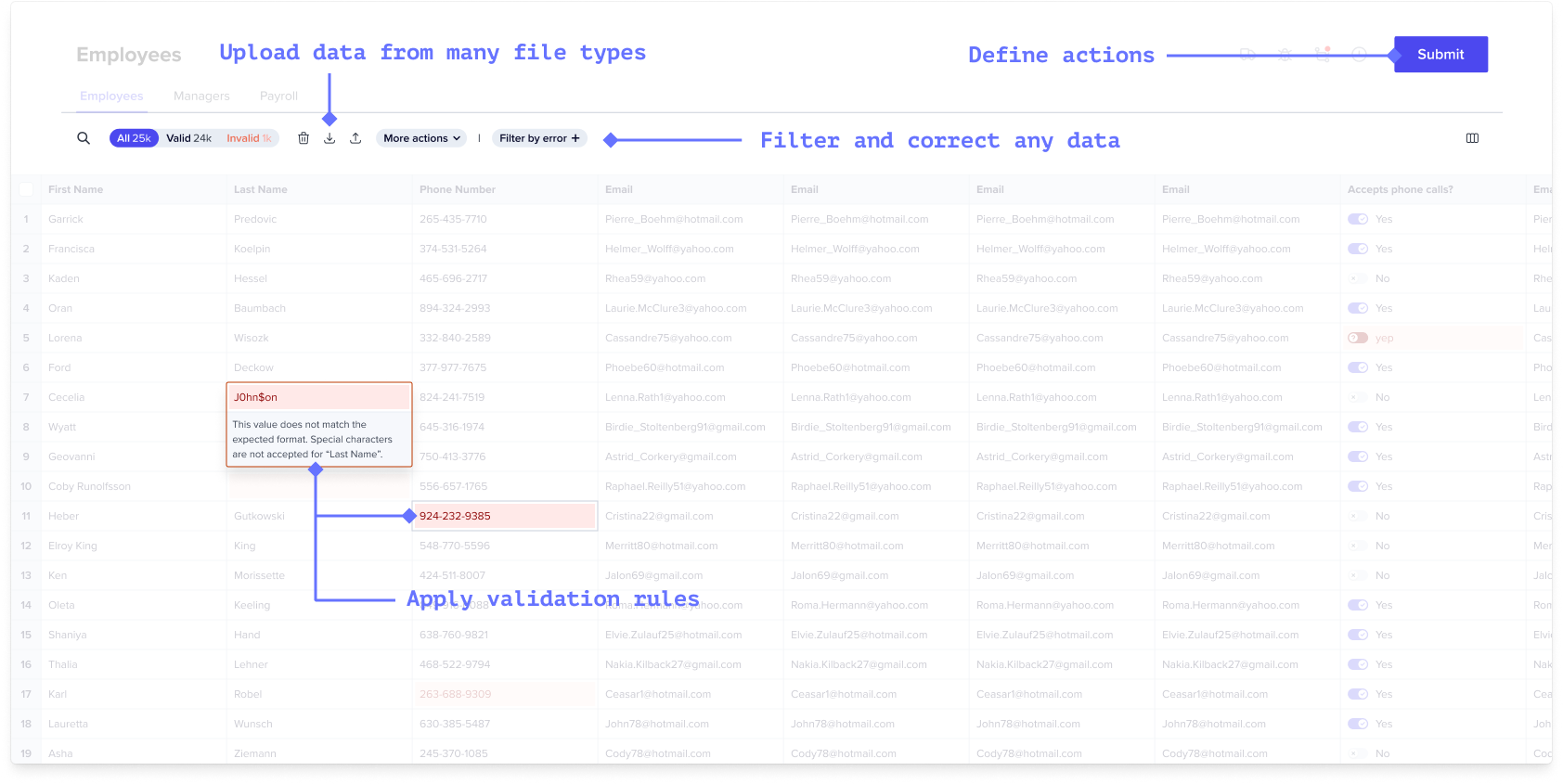 With Workbooks, you can:
1. Accept data from many file types beyond CSVs. (And you can write your own
file extractors if you can't find a plugin.)
2. Automatically apply any validation rules a developer has previously defined.
3. Provide end users the ability to add, remove, review, filter, and correct any
data imported into a Workbook.
4. Define, in code, at least one primary Action that submits the reviewed data
to a destination API, database, or workflow step of your choosing.
***
## Anatomy
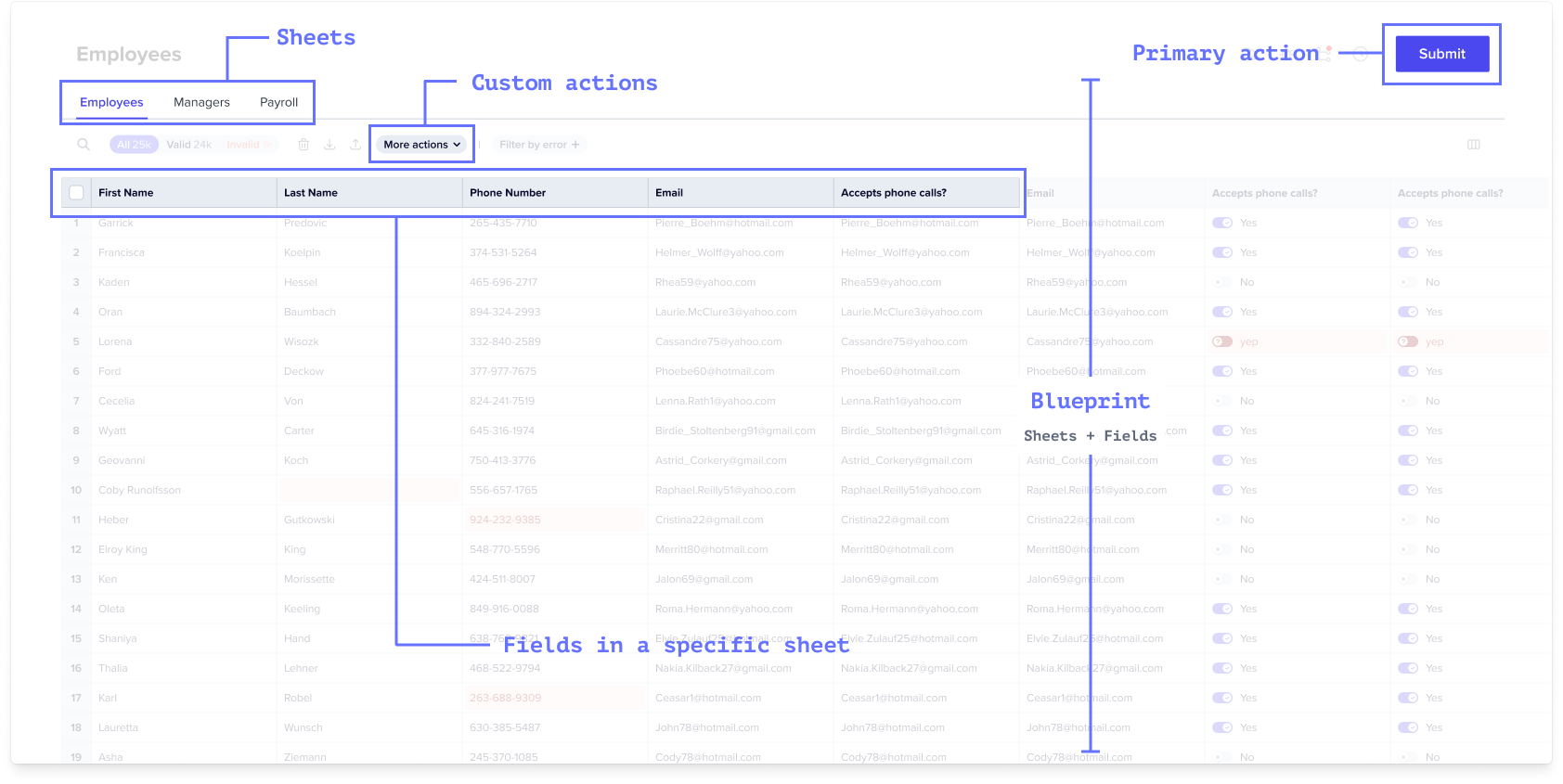
A Workbook is comprised of one or more
[Sheets](/learning-center/blueprint/field-types)
plus any actions you want to take on those Sheets.
With Workbooks, you can:
1. Accept data from many file types beyond CSVs. (And you can write your own
file extractors if you can't find a plugin.)
2. Automatically apply any validation rules a developer has previously defined.
3. Provide end users the ability to add, remove, review, filter, and correct any
data imported into a Workbook.
4. Define, in code, at least one primary Action that submits the reviewed data
to a destination API, database, or workflow step of your choosing.
***
## Anatomy
A Workbook is comprised of one or more
[Sheets](/learning-center/blueprint/field-types)
plus any actions you want to take on those Sheets.
 ### Reference
[See API Reference](https://reference.flatfile.com/api-reference/workbooks/create-a-workbook)
#### `Sheets` *array*
A schema contains Sheets. Like tables in a database or sheets in a spreadsheet,
Sheets isolate different data schemas.
[Learn more about Blueprint](/learning-center/blueprint/about)
#### `Fields` *array*
Sheets contain
[Fields](/learning-center/blueprint/field-types)
. Fields are defined properties of your schema (eg a first\_name on a contact
sheet.)
[Learn more about Blueprint](/learning-center/blueprint/about)
#### `Actions` *array*
Workbooks and Sheets can also contain Actions. Actions are developer-defined
operations or macros invoked by end users on selected data like Submit to API,
Download as PDF.
[Learn more about Actions](/learning-center/concepts/actions)
#### `Settings` *object*
`trackChanges: true`: Disables actions on Sheet and Workbook when there is a
commit that has not been completed (often when Hooks are running)
`noMappingRedirect: true`: When the user drags a file into a Sheet in this
Workbook, usually the user is redirected to the Mapping step. This setting
prevents that redirect. This is especially useful when you are using the
[automap plugin](/learning-center/guides/automap).
[Learn more about Blueprint](/learning-center/blueprint/about)
#### `Labels` *array*
To have a workbook appear first in the sidebar, give it the label `pinned` (it
will even have a pin icon!). You can also add other custom labels to your
workbooks as needed.
### Reference
[See API Reference](https://reference.flatfile.com/api-reference/workbooks/create-a-workbook)
#### `Sheets` *array*
A schema contains Sheets. Like tables in a database or sheets in a spreadsheet,
Sheets isolate different data schemas.
[Learn more about Blueprint](/learning-center/blueprint/about)
#### `Fields` *array*
Sheets contain
[Fields](/learning-center/blueprint/field-types)
. Fields are defined properties of your schema (eg a first\_name on a contact
sheet.)
[Learn more about Blueprint](/learning-center/blueprint/about)
#### `Actions` *array*
Workbooks and Sheets can also contain Actions. Actions are developer-defined
operations or macros invoked by end users on selected data like Submit to API,
Download as PDF.
[Learn more about Actions](/learning-center/concepts/actions)
#### `Settings` *object*
`trackChanges: true`: Disables actions on Sheet and Workbook when there is a
commit that has not been completed (often when Hooks are running)
`noMappingRedirect: true`: When the user drags a file into a Sheet in this
Workbook, usually the user is redirected to the Mapping step. This setting
prevents that redirect. This is especially useful when you are using the
[automap plugin](/learning-center/guides/automap).
[Learn more about Blueprint](/learning-center/blueprint/about)
#### `Labels` *array*
To have a workbook appear first in the sidebar, give it the label `pinned` (it
will even have a pin icon!). You can also add other custom labels to your
workbooks as needed.